Korak 1: Dodamo disk v VirtualBox
V našem primeru Oracle1819_1.vdi

.
Korak 2 : Preverimo na Linux-u
lsblk
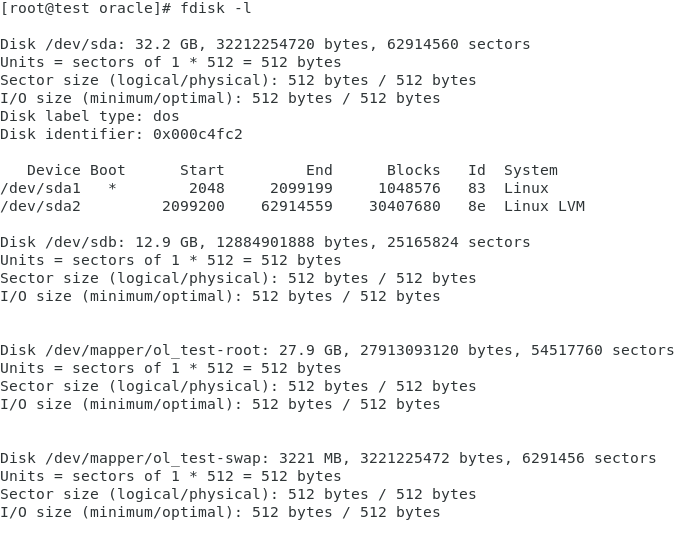
V našem primeru je to disk sdb

Preverimo detaljno
fdisk -l
Korak 3: Kreiramo particije za novi disk
fdisk /dev/sdb
Izvedemo:
[root@test oracle]# fdisk /dev/sdb
Welcome to fdisk (util-linux 2.23.2).
Changes will remain in memory only, until you decide to write them.
Be careful before using the write command.
Device does not contain a recognized partition table
Building a new DOS disklabel with disk identifier 0x3752b58b.
Command (m for help):
Command (m for help): m
Command action
a toggle a bootable flag
b edit bsd disklabel
c toggle the dos compatibility flag
d delete a partition
g create a new empty GPT partition table
G create an IRIX (SGI) partition table
l list known partition types
m print this menu
n add a new partition
o create a new empty DOS partition table
p print the partition table
q quit without saving changes
s create a new empty Sun disklabel
t change a partition’s system id
u change display/entry units
v verify the partition table
w write table to disk and exit
x extra functionality (experts only)
Command (m for help): n
Partition type:
p primary (0 primary, 0 extended, 4 free)
e extended
Select (default p): p
Partition number (1-4, default 1):
First sector (2048-25165823, default 2048): t
First sector (2048-25165823, default 2048):
Using default value 2048
Last sector, +sectors or +size{K,M,G} (2048-25165823, default 25165823):
Using default value 25165823
Partition 1 of type Linux and of size 12 GiB is set
Command (m for help): w
The partition table has been altered!
Calling ioctl() to re-read partition table.
Syncing disks.
[root@test oracle]#
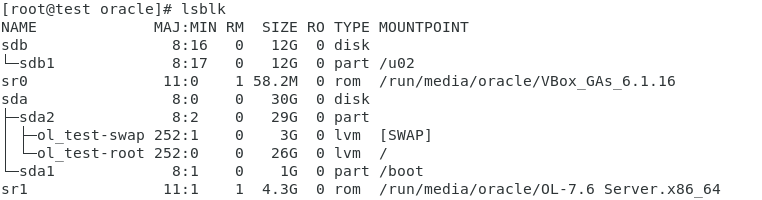
Korak 4: Preverimo Verify the newly created partition
lsblk

Korak 5: Formatiramo novo particijo
[root@test oracle]# mkfs.xfs /dev/sdb1
After completing the above command, the next step is to mount this newly created partition to the file system.
Korak 6: Pristavimo disk
mkdir /u02
mount /dev/sdb1 /u02
Korak 6: Konfiguriramo auto mount
V /etc/fstab dodamo:
/dev/sdc1 /data2 xfs defaults 0 0