Profili nam omogočajo, da reguliramo uporabo sistemskih virov za posameznega uporabnika. Privzeti profil je DEFAULT. Profili so bili uvedeni v verziji 8.
Profile za posameznika lahko prikažemo takole:
SELECT USERNAME, PROFILE, ACCOUNT_STATUS FROM DBA_USERS;
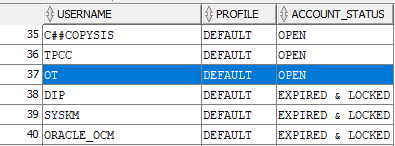
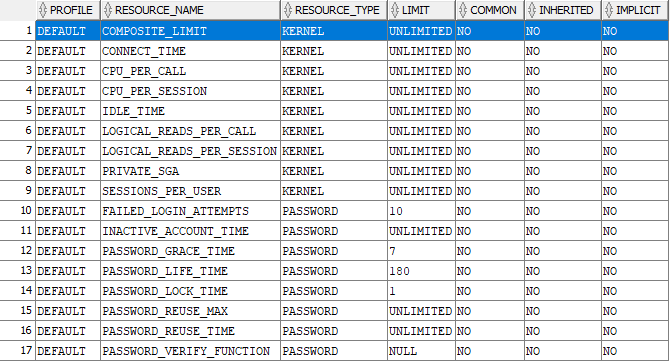
Lahko pogledamo vse vire za DEFAULT profile
SELECT * FROM
dba_profiles
WHERE
PROFILE = ‘DEFAULT’
ORDER BY
resource_type,
resource_name;
Link: https://docs.oracle.com/en/database/oracle/oracle-database/19/sqlrf/CREATE-PROFILE.html
CREATE PROFILE profile
LIMIT { resource_parameters
| password_parameters
}…
[ CONTAINER = { CURRENT | ALL } ] ;
resource_parameters
SESSIONS_PER_USER
Specify the number of concurrent sessions to which you want to limit the user.
Specify the CPU time limit for a session, expressed in hundredth of seconds.
Specify the CPU time limit for a call (a parse, execute, or fetch), expressed in hundredths of seconds.
CONNECT_TIME
Specify the total elapsed time limit for a session, expressed in minutes.
IDLE_TIME
Specify the permitted periods of continuous inactive time during a session, expressed in minutes. Long-running queries and other operations are not subject to this limit.
When you set an idle timeout of X minutes, note that the session will take a couple of additional minutes to be terminated.
On the client application side, the error message shows up only the next time, when the idle client attempts to issue a new command.
LOGICAL_READS_PER_SESSION
Specify the permitted number of data blocks read in a session, including blocks read from memory and disk.
Specify the permitted number of data blocks read for a call to process a SQL statement (a parse, execute, or fetch).
PRIVATE_SGA
Specify the amount of private space a session can allocate in the shared pool of the system global area (SGA). Refer to size_clause for information on that clause.
Note:
This limit applies only if you are using shared server architecture. The private space for a session in the SGA includes private SQL and PL/SQL areas, but not shared SQL and PL/SQL areas.
Specify the total resource cost for a session, expressed in service units. Oracle Database calculates the total service units as a weighted sum of CPU_PER_SESSION, CONNECT_TIME, LOGICAL_READS_PER_SESSION, and PRIVATE_SGA.
password_parameters
Use the following clauses to set password parameters. Parameters that set lengths of time—that is, all the password parameters except FAILED_LOGIN_ATTEMPTS and PASSWORD_REUSE_MAX—are interpreted in number of days. For testing purposes you can specify minutes (n/1440) or even seconds (n/86400) for these parameters. You can also use a decimal value for this purpose (for example .0833 for approximately one hour). The minimum value is 1 second. The maximum value is 24855 days. For FAILED_LOGIN_ATTEMPTS and PASSWORD_REUSE_MAX, you must specify an integer.
Specify the number of consecutive failed attempts to log in to the user account before the account is locked. If you omit this clause, then the default is 10 times.
Specify the number of days the same password can be used for authentication. If you also set a value for PASSWORD_GRACE_TIME, then the password expires if it is not changed within the grace period, and further connections are rejected. If you omit this clause, then the default is 180 days.
See Also:
Oracle Database Security Guide for information on setting PASSWORD_LIFE_TIME to a low value
PASSWORD_REUSE_TIME and PASSWORD_REUSE_MAX
These two parameters must be set in conjunction with each other. PASSWORD_REUSE_TIME specifies the number of days before which a password cannot be reused. PASSWORD_REUSE_MAX specifies the number of password changes required before the current password can be reused. For these parameter to have any effect, you must specify a value for both of them.
- If you specify a value for both of these parameters, then the user cannot reuse a password until the password has been changed the number of times specified for
PASSWORD_REUSE_MAXduring the number of days specified forPASSWORD_REUSE_TIME.For example, if you specifyPASSWORD_REUSE_TIMEto 30 andPASSWORD_REUSE_MAXto 10, then the user can reuse the password after 30 days if the password has already been changed 10 times. - If you specify a value for either of these parameters and specify
UNLIMITEDfor the other, then the user can never reuse a password. - If you specify
DEFAULTfor either parameter, then Oracle Database uses the value defined in theDEFAULTprofile. By default, all parameters are set toUNLIMITEDin theDEFAULTprofile. If you have not changed the default setting ofUNLIMITEDin theDEFAULTprofile, then the database treats the value for that parameter asUNLIMITED. - If you set both of these parameters to
UNLIMITED, then the database ignores both of them. This is the default if you omit both parameters.
Specify the number of days an account will be locked after the specified number of consecutive failed login attempts. If you omit this clause, then the default is 1 day.
Specify the number of days after the grace period begins during which a warning is issued and login is allowed. If you omit this clause, then the default is 7 days.
INACTIVE_ACCOUNT_TIME
Specify the permitted number of consecutive days of no logins to the user account, after which the account will be locked. The minimum value is 15 days. The maximum value is 24855. If you omit this clause, then the default is UNLIMITED.
You can pass a PL/SQL password complexity verification script as an argument to CREATE PROFILE by specifying PASSWORD_VERIFY_FUNCTION. Oracle Database provides a default script, but you can write your own function or use third-party software instead.
- For
function, specify the name of the password complexity verification routine. The function must exist in theSYSschema and you must haveEXECUTEprivilege on the function. - Specify
NULLto indicate that no password verification is performed.
If you specify expr for any of the password parameters, then the expression can be of any form except scalar subquery expression.
Restriction on Password Parameters
When you assign a profile to an external user or a global user, the password parameters do not take effect for that user.
See Also:
“Setting Profile Password Limits: Example“
PASSWORD_ROLLOVER_TIME
From Oracle 21c onward we can define a gradual password rollover time, which allows us to connect using both the old and the new passwords during the gradual rollover time period. This means we can alter the database user password, and work through any application connections without having a hard cut-off for new connections. This feature was backported to Oracle 19c in the 19.12 release update.
You must configure a non-zero limit for the PASSWORD_ROLLOVER_TIME user profile parameter in order to enable the gradual database password rollover. You can configure this parameter using CREATE PROFILE or ALTER PROFILE.
Use expr to specify a value for PASSWORD_ROLLOVER_TIME in days. You must specify hours as a fraction of one day. For example, if you want to set the limit to four hours, expr would be 4/24 .
The granularity of the PASSWORD_ROLLOVER_TIME limit value is one second. For example, you can have a limit of one hour plus three minutes and five seconds by providing an expr like this: ( 1/24) + ( 3/1440) + (5/86400) ) .
The default setting for PASSWORD_ROLLOVER_TIME is 0, which means that gradual password rollover is disabled.
Which four account management capabilities can be configured using Oracle profiles? (Choose four.)
- A. the number of hours for which an account is locked after the configured number of login attempts has been reached
- B. the number of days for which an account may be inactive before it is locked INACTIVE_ACCOUNT_TIME
- C. the maximum amount of CPU time allowed for a user’s sessions before their account is locked
- D. the ability to prevent a password from ever being reused PASSWORD_LIFE_TIME
- E. the number of password changes required within a period of time before a password can be reused PASSWORD_REUSE_TIME and PASSWORD_REUSE_MAX
- F. the number of days for which an account is locked after the configured number of login attempts has been reached PASSWORD_LOCK_TIME
- G. the maximum number of sessions permitted for a user before the account is locked