Overview of Oracle Data Pump
Oracle Data Pump technology enables very high-speed movement of data and metadata from one database to another.
An understanding of the following topics can help you to successfully use Oracle Data Pump to its fullest advantage:
- Oracle Data Pump Components
Oracle Data Pump is made up of three distinct components: Command-line clients,expdpandimpdp; theDBMS_DATAPUMPPL/SQL package (also known as the Data Pump API); and theDBMS_METADATAPL/SQL package (also known as the Metadata API). - How Does Oracle Data Pump Move Data?
There are several Oracle Data Pump methods that you can use to move data in and out of databases. You can select the method that best fits your use case. - Using Oracle Data Pump With CDBs
Oracle Data Pump can migrate all, or portions of, a database from a non-CDB into a PDB, between PDBs within the same or different CDBs, and from a PDB into a non-CDB. - Cloud Premigration Advisor Tool
The Cloud Premigration Advisor tool can assist you to migrate a database to the Oracle Cloud. - Required Roles for Oracle Data Pump Export and Import Operations
The rolesDATAPUMP_EXP_FULL_DATABASEandDATAPUMP_IMP_FULL_DATABASEare required for many Export and Import operations. - What Happens During the Processing of an Oracle Data Pump Job?
Oracle Data Pump jobs use a Data Pump control job table, a Data Pump control job process, and worker processes to perform the work and keep track of progress. - How to Monitor Status of Oracle Data Pump Jobs
The Oracle Data Pump Export and Import client utilities can attach to a job in either logging mode or interactive-command mode. - How to Monitor the Progress of Executing Jobs
To monitor table data transfers, you can use theV$SESSION_LONGOPSdynamic performance view to monitor Oracle Data Pump jobs. - File Allocation with Oracle Data Pump
You can modify how Oracle Data Pump allocates and handles files by using commands in interactive mode. - Exporting and Importing Between Different Oracle Database Releases
You can use Oracle Data Pump to migrate all or any portion of an Oracle Database between different releases of the database software. - Exporting and Importing Blockchain Tables with Oracle Data Pump
To export or import blockchain tables, review these minimum requirements, restrictions, and guidelines. - Managing SecureFiles Large Object Exports with Oracle Data Pump
Exports of SecureFiles large objects (LOBs) are affected by the content type, theVERSIONparameter, and other variables. - Oracle Data Pump Process Exit Codes
To check the status of your Oracle Data Pump export and import operations, review the process exit codes in the log file. - How to Monitor Oracle Data Pump Jobs with Unified Auditing
To monitor and record specific user database actions, perform auditing on Data Pump jobs with unified auditing. - Encrypted Data Security Warnings for Oracle Data Pump Operations
Oracle Data Pump warns you when encrypted data is exported as unencrypted data. - How Does Oracle Data Pump Handle Timestamp Data?
Learn about factors that can affect successful completion of export and import jobs that involve the timestamp data typesTIMESTAMP WITH TIMEZONEandTIMESTAMP WITH LOCAL TIMEZONE. - Character Set and Globalization Support Considerations
Learn about Globalization support of Oracle Data Pump Export and Import using character set conversion of user data, and data definition language (DDL). - Oracle Data Pump Behavior with Data-Bound Collation
Oracle Data Pump supports data-bound collation (DBC).
You execute this command: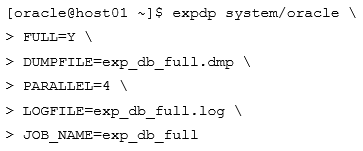
During the export operation, you detach from the job by using CTRL+C and then execute this command:
Export> STOP_JOB=immediate –
Are you sure you wish to stop the job ([yes]/no): yes
Which two statements are true about the job? (Choose two.)

- A. You can no longer monitor it
- B. You can reattach to it and monitor it
- C. It is paused and can be resumed
- D. It continues to run in the background
- E. It terminates
Primer:

